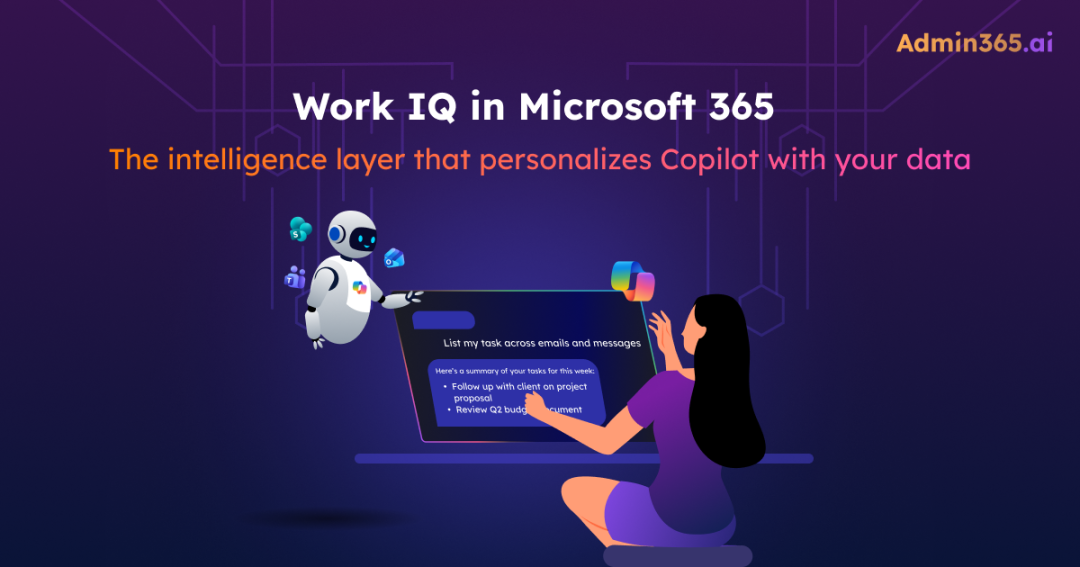
If you ask what powers Microsoft 365 Copilot, most people will say Microsoft Graph. And a year ago, that was a complete answer. Today, it’s only part of the story.
At Ignite 2025, Microsoft introduced Work IQ, the intelligence layer built on top of Graph. While Graph gives Copilot access to your Microsoft 365 data, including emails, files, meetings, and chats, Work IQ helps it understand that data in context. It can recognize that a SharePoint document, a Teams meeting, and an Outlook email thread are all part of the same project, even when no one explicitly connects them.
In this guide, we’ll explore what Work IQ is and how it works in Microsoft 365 to deliver more context-aware and intelligent Copilot responses.
What is Microsoft Work IQ?
To understand Work IQ, let’s first look at how Copilot and other AI assistants worked before it.
Before Microsoft Work IQ, when a user submitted a prompt in Copilot, the system retrieved data from sources like SharePoint, Teams, and Outlook through Microsoft Graph, processed it, and generated a response. While this approach worked, every prompt started from scratch. There was no persistent understanding of how work flows across an organization.
Work IQ changes this by acting as the “brain” behind Copilot. This intelligence layer understands data in context, including relationships, patterns, and how work connects across users and tools to enable faster and more accurate responses. Work IQ also personalizes Microsoft 365 Copilot and agents for both individual users and organizations. It sits between data from Microsoft Graph, Dataverse, and external connectors, and the AI experiences where users interact with Copilot Chat, Copilot in apps, Copilot Cowork, and AI agents.
In simple terms, Graph tells Copilot what exists in Microsoft 365, while Work IQ tells Copilot what matters.
How Work IQ Works in Microsoft 365
Work IQ is built on three distinct layers that provide a shared context for every AI interaction within a Microsoft 365 tenant. By coordinating these layers, Microsoft ensures that AI doesn’t just “see” data but understands the context behind it.
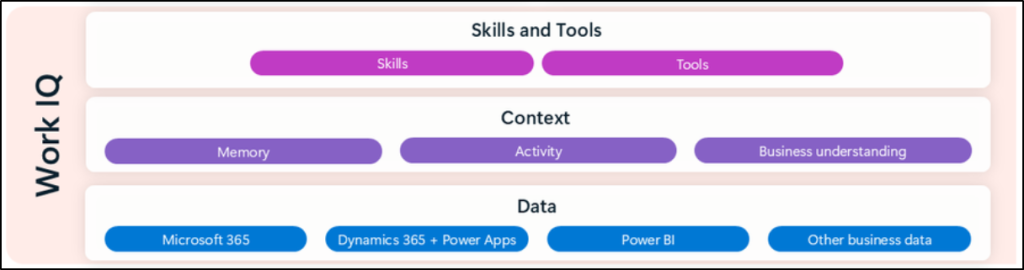
1. The Data Layer: What Work IQ Reads
This is the foundational layer of Microsoft Work IQ. It processes both structured and unstructured data from Microsoft 365 that represents the active work happening across your organization. Every interaction, whether it’s an email sent, a Teams message posted, a meeting attended, or a document updated, contributes to this layer. Instead of treating these as isolated activities, Work IQ interprets them as signals that reveal how users collaborate and how work flows over time. This also includes rich metadata to map patterns of collaboration between specific users and groups.
Beyond basic activity, the data layer is designed with enterprise-grade flexibility and security:
- Permission-based access: Work IQ strictly respects existing permissions. The AI can only “read” and process signals that the user already has the right to access. It does not bypass your tenant’s governance policies.
- Extensibility via connectors: Organizations can integrate data from non-Microsoft applications using hundreds of pre-built or custom connectors. This ensures your “Work IQ” isn’t limited to just the Microsoft ecosystem.
- Unified business data: In addition to M365 data, Microsoft has integrated Dynamics 365, Power Apps, and Power BI into this intelligence surface. By Summer 2026, users will be able to seamlessly access Work IQ across both Microsoft 365 productivity and business data.
2. The Memory Layer: How Work IQ Remembers
This layer is what transforms Copilot and AI agents from a reactive tool into a proactive partner. By maintaining a persistent memory of your organization’s unique culture and logic, Work IQ ensures that AI interactions are deeply relevant to every user. This is achieved through three core components:
- Advanced memory systems: Work IQ builds a profile using a combination of explicit and implicit memory.
- Explicit memory: User-defined instructions like “format responses in Markdown” or “focus on costs over timelines,” saved and reused across interactions.
- Implicit memory: Insights derived from chat history, workflows, and activity across Microsoft 365, enabling increasingly personalized responses over time.
- Semantic index: Moving beyond keyword matching, Work IQ enables meaning-based retrieval. For example, a search for “Q4 planning” can surface related content like “annual budget review” or “year-end forecasting” by understanding the relationship between concepts.
- Business understanding: Work IQ captures organizational knowledge using ontologies and glossaries. It recognizes that different departments may use different names for the same process, helping Copilot understand how your business processes work.
3. The Inference Layer: How Work IQ Connects the Dots
This layer brings together models, skills, and tools to enable Copilot and agents to reason, make decisions, and take action. Skills define what needs to be done by providing task-specific instructions, while tools handle the execution. Microsoft continuously adds new skills to Work IQ to support scenarios such as scheduling meetings, retrieving data, and summarizing information.
It also leverages a range of tools, including APIs, connectors, agent workflows, and other integrations, to help Copilot observe, retrieve, reason, and act on user intent. For practical purposes, this means Copilot can answer questions like “What’s the status of Project Alpha?” by synthesizing signals from meetings, emails, shared files, and Teams conversations, without requiring a manually maintained status tracker.
Difference between Microsoft Graph and Microsoft Work IQ
If you’ve been assuming Work IQ replaces Microsoft Graph, or that it’s just a rebrand, neither is quite right. Here’s how they actually relate.
| Aspect | Microsoft Graph | Work IQ |
| Role | Data access layer | Intelligence layer |
| What it provides | Unified API to query M365 data | Contextual understanding of Microsoft 365 data |
| Retrieval | Keyword and filter-based | Semantic (meaning-based) retrieval |
| Memory | No persistent memory (stateless API) | Persistent memory across sessions |
| Inference | Limited (returns what you query) | Connects disconnected data into a meaningful context |
| Interaction type | Explicit queries (API calls) | Natural language and AI-driven reasoning |
| Output | Raw data | Insights, summaries, and actions |
| Use case | “Get me John’s emails from last week.” | “What did John’s team decide about the Q4 budget?” |
Everything still starts with Graph. Work IQ doesn’t replace it — it builds on top of it. Graph handles the plumbing, such as data access, authentication, and permissions, while Work IQ adds reasoning, memory, and inference.
Think of the Microsoft Graph as a massive library. It contains every book, file, and message your organization has ever created, organized neatly on shelves. Work IQ is the librarian. It doesn’t just know where the books are; it knows which books belong together, remembers what you researched last month, and can point you to the right shelf even if you don’t know the exact title of the book you’re looking for.
License Requirement for Work IQ in Microsoft 365
As of Microsoft 365 E5, if a user has a Microsoft 365 Copilot add-on license, Work IQ is already included as part of the experience. In Microsoft 365 E7, Copilot is included by default in the bundle. Therefore, Work IQ is also available by default.
Microsoft Work IQ for Developers
Work IQ is not limited to Copilot experiences. Microsoft is also enabling developers to access Work IQ capabilities through tools like the Model Context Protocol (MCP) server and a command-line interface (CLI). These tools allow developers to connect Agent 365-powered AI assistants to Microsoft 365 data, enabling natural language queries across emails, meetings, documents, and Teams messages.
CLI mode: You can run queries directly from the terminal using commands like workiq ask. This allows quick access to Microsoft 365 data using natural language. You can install Work IQ globally using npm or execute queries directly with npx.
MCP server mode: In this mode, Work IQ integrates with AI assistants such as GitHub Copilot in Visual Studio Code or CLI-based tools. This enables coding assistants to access Microsoft 365 data contextually, allowing them to retrieve relevant work information while you write code. This is particularly powerful because the AI assistant can automatically bring in useful context, such as documents, conversations, or meeting details, based on your queries or tasks.
When Work IQ MCP or CLI is used for the first time, a consent prompt appears requesting administrative access to Microsoft 365 data. If you do not have sufficient access, you may need to contact your tenant administrator to grant the required permissions.
Security and Governance of Microsoft 365 Work IQ
Before adopting any AI capability, it’s important to understand how it handles data within your Microsoft 365 environment. Work IQ is designed to operate within the existing security, compliance, and governance boundaries of your tenant.
Permission-Based Access
Work IQ respects existing Microsoft 365 permissions. It does not grant additional access or perform privilege escalation. Users can only access data they are already authorized to view in Microsoft 365.
Sensitivity Labels and DLP
Existing sensitivity labels and Data Loss Prevention (DLP) policies continue to apply. Any protections configured for Microsoft 365 and Copilot are also enforced in Work IQ responses.
Data Handling and Storage
Work IQ retrieves information dynamically when responding to queries. It does not create a separate persistent copy of your organizational data. All processing aligns with Microsoft 365 security and compliance controls.
Compliance and Data Residency
Work IQ adheres to Microsoft’s compliance standards, including GDPR and EU Data Boundary requirements, ensuring that data is handled according to regional and regulatory policies.
Governance of Work IQ MCP Server
You have full visibility and control over Work IQ MCP server access from the Microsoft 365 admin center. This allows organizations to control whether MCP-based integrations are allowed or blocked across the tenant.
What Are the Different Microsoft IQ Layers?
Now that you have a better understanding of Work IQ, let’s take a quick look at the other intelligence layers in the Microsoft ecosystem. Microsoft is building multiple intelligence layers, each serving a different part of the enterprise AI stack. Understanding how these layers work together helps you see where Work IQ fits and how it connects with broader data and AI capabilities.
| Feature | Work IQ | Fabric IQ | Foundry IQ |
| Primary Scope | Microsoft 365 | Microsoft Fabric | Microsoft Foundry |
| What It Does | Intelligence across emails, meetings, documents, Teams, and workflows. | Semantic foundation for business data; defines concepts like customer, product, and revenue, and binds them to data sources. | Knowledge grounding for enterprise content such as documents, policies, FAQs, contracts, and manuals. |
Together, these three layers form a unified intelligence fabric. A truly advanced enterprise agent can draw from all three simultaneously:
- Work IQ provides the collaboration context (Who is working on this and what was said?).
- Fabric IQ provides the business data (What are the actual revenue numbers or inventory levels?).
- Foundry IQ provides the organizational knowledge (What is our official company policy on this process?).
For most Microsoft 365 admins, Work IQ is the immediate priority. It is the layer that directly impacts the daily Copilot and agent experience. Fabric IQ becomes relevant when your data teams begin building custom analytics agents, while Foundry IQ is the focus for AI teams developing specialized, knowledge-grounded assistants for HR or Legal departments.
Frequently Asked Questions
These are the questions that come up most when admins and developers first encounter Work IQ.
- Is Work IQ a replacement for Microsoft Graph?
No. Graph handles data access. Work IQ adds intelligence on top of Graph (memory, semantic understanding, inference). Both work together. Every Work IQ query still flows through Graph for data retrieval.
2. Do I need a separate license for Work IQ?
No. Work IQ is included with the Microsoft 365 Copilot license. No additional purchase required.
3. Can Work IQ access data I don’t have permission to see?
No. Work IQ respects existing M365 permissions, sensitivity labels, and DLP policies. It only returns data that the authenticated user can already access.
4. Is Work IQ available outside Microsoft 365 Copilot?
Yes, through the MCP server and CLI. Developers can connect GitHub Copilot, Claude Code, VS Code, and other AI assistants to Work IQ. The same intelligence layer that powers M365 Copilot becomes available to third-party AI tools.
5. What’s the difference between Work IQ, Fabric IQ, and Foundry IQ?
Three layers of the same intelligence framework. Work IQ serves Microsoft 365 (productivity data). Fabric IQ serves Microsoft Fabric (business data semantics). Foundry IQ serves Microsoft Foundry (enterprise knowledge and documents). Agents can draw from all three.
Work IQ moves Copilot from “search and summarize” to “understand and act.” That shift matters. Because the value of AI in Microsoft 365 isn’t just about better answers, it’s about better context. When Copilot understands relationships between users, conversations, and content, the output becomes far more useful.
If you’re working with Microsoft 365, the key is to first understand how Work IQ is structured. Once that clicks, everything else, from Copilot behavior to agent scenarios, starts to make a lot more sense.