Microsoft keeps shipping new workplace AI faster than most of us can keep the names straight. From Copilot Chat and Copilot Studio to Copilot Cowork, the product lineup is already crowded, and now Microsoft Scout has entered the picture. With so many AI tools in play, the confusion is completely fair: Is Scout just Copilot wearing a fresh marketing badge?
The honest answer is a resounding no. ❌
While Microsoft 365 Copilot is a reactive assistant that waits for your prompt, Microsoft Scout is an always-on desktop autopilot. Driven by background schedules and its own Entra ID identity, Scout proactively runs local scripts, automates browsers, and coordinates workflows while you are away from your desk.
In this blog, let’s break down the differences between Microsoft Scout and Microsoft 365 Copilot. By the end of this blog, you’ll be able to tell them apart and know exactly which one to reach for.
Microsoft Scout vs Copilot: The Two Different AI Categories by Microsoft 365
Let’s start with a common myth, because almost every user arrives here with it: Microsoft Scout does not replace Copilot. Scout is Microsoft’s first Autopilot, a brand-new category of AI agent that lives inside the broader Copilot ecosystem. It is built to run alongside Copilot, not swap it out.
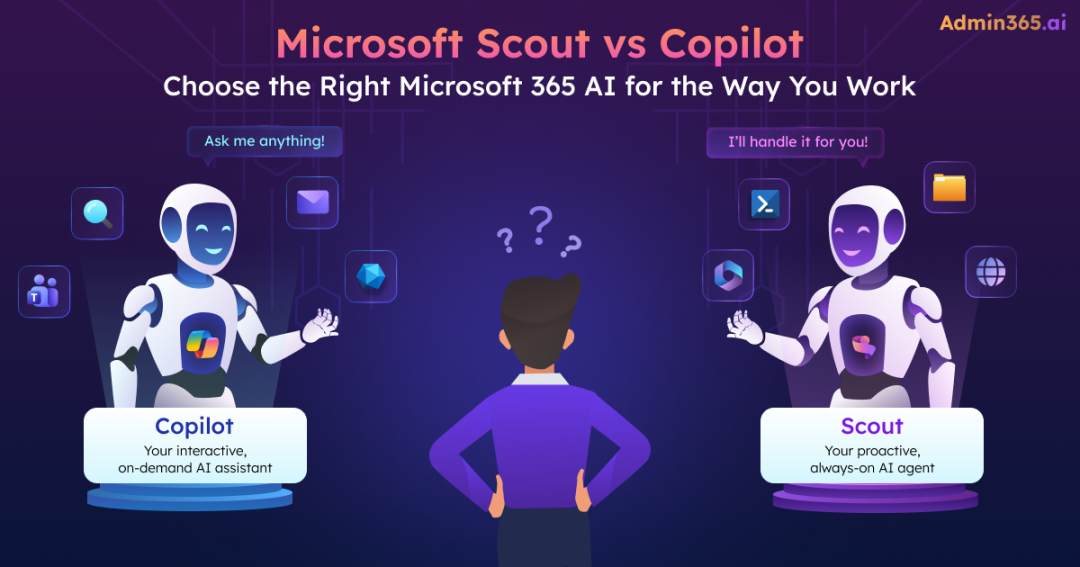
The cleanest way to hold the difference is that Copilot is the assistant you prompt and Scout is the agent that acts for you.
Copilot waits for a request, helps you complete a task, and then waits for the next instruction. Scout operates differently. It can monitor assigned goals, react to changing conditions, take action when needed, and continue working autonomously in the background.
The table below highlights the key differences between Microsoft’s AI assistant and its new Autopilot agent.
| Feature | Microsoft 365 Copilot | Microsoft Scout |
| What it is | An AI assistant | An always-on Autopilot |
| Interaction Model | Prompt-driven | Goal-driven |
| Trigger | Reactive: you ask, it answers | Proactive: runs on schedules, triggers, and goals |
| Where it runs | Microsoft 365 cloud services and apps; chat | Desktop app with Microsoft 365 integration |
| Reach | Your Microsoft 365 data through Microsoft Graph | Local files, shell, browser, and Microsoft 365 data |
| Identity | Acts as the signed-in user | Its own governed Entra identity |
| Licensing Requirements | Free Copilot Chat (eligible Microsoft 365 plans) or M365 Copilot Add-on License (30$/user/month) | Active M365 Copilot license and a GitHub Copilot Business/Enterprise license |
| Availability | Generally available (GA) | Preview, through the Frontier program |
The Differences That Separate Microsoft Scout from Microsoft 365 Copilot
The comparison table gives you the headlines, but it doesn’t tell the whole story. Let’s dive deep into the differences between Microsoft Scout and Copilot that actually affect how you’d use and govern each one.
Interaction Model: Reactive vs Proactive
Microsoft 365 Copilot: It is reactive. You open Copilot, ask a question, generate content, summarize a document, or analyze data, and Copilot responds. The execution turn ends right there, and the AI goes back to sleep until you prompt it again.
Microsoft Scout: This always-on AI agent is proactive. It breaks away from the chat box and runs autonomously using two distinct background modes:
- Heartbeat – This mode repeatedly executes a prompt at predefined intervals, such as every 15 minutes, 30 minutes, 1 hour, or 2 hours.
- Automations – This mode can run on schedules or trigger when specific conditions are met. You set the core objective up once, and Scout keeps executing it in the background.
For example, you might ask Copilot to summarize a project status meeting. Scout, on the other hand, can monitor the project throughout the day, track changes, and notify stakeholders when deadlines start slipping.
Surface and Reach: Cloud Assistant vs Desktop Agent
Microsoft 365 Copilot: It is primarily a cloud-based service integrated into Microsoft 365 applications such as Word, Excel, Outlook, Teams, and Copilot Chat. It uses Microsoft Graph to access the data you already have permission to view and helps you work with that information more efficiently. It does not touch your machine.
Microsoft Scout: It is a desktop application for Windows 11 or macOS 12 and later. Because it runs on your device, Scout can interact with resources that Microsoft 365 Copilot cannot directly access. These include:
- Reading, writing, and searching local files and folders
- Automating browser interactions through Playwright
- Running shell commands and scripts
- Executing local builds and tests
- Exploring code repositories and development environments
- Working with tools such as Git, GitHub CLI, PowerShell, and terminal environments
At the same time, Scout can still access Microsoft 365 services such as Outlook, Teams, OneDrive, SharePoint, and Calendar.
This means a single Scout workflow can cross boundaries that Copilot cannot. Copilot excels inside documents, chats, and Microsoft 365 applications. Scout extends that reach to the operating system itself.
Identity and Governance: User Identity vs Agent Identity
Microsoft 365 Copilot: Acts as the signed-in user’s identity to perform a task. Every response is bounded by the user’s existing Graph permissions. If a user cannot access a resource, Copilot cannot access it either. Therefore, all its actions trace back to the user account.
Microsoft Scout: Each agent runs under its own, distinct governed Entra identity rather than a shared service account. If Scout fires an automation sequence at 2:00 AM while you are fast asleep, that event log is completely attributable to its own service identity within your tenant’s audit trail. Importantly, Scout does not bypass organizational permissions. It still respects the access boundaries assigned to the users.
Furthermore, this always-on autopilot AI agent comes with strict guardrails designed for unsupervised automation:
- Privileged shell commands are denied by default.
- Destructive or external actions (like sending an email or modifying a global calendar event) pause automatically to wait for your manual approval.
- Background modes execute under much more restrictive data policies than interactive sessions.
Licensing and Availability: Buy It Today vs Apply for Preview
Microsoft 365 Copilot: This reactive AI assistance is generally available now. Copilot Chat (web) is included at no extra cost with eligible Microsoft 365 subscriptions, and the Microsoft 365 Copilot application experience is a globally available add-on license that you can purchase and provision today.
Microsoft Scout: Currently offered as an Experimental preview. It’s currently gated behind Microsoft’s Frontier program, and getting access takes more than a purchase. Because Scout’s client-side runtime engine is built on top of the GitHub Copilot SDK, users must be concurrently assigned two entirely separate licenses to activate it.
- Microsoft 365 Copilot license
- GitHub Copilot (Business or Enterprise) license
On top of that, an admin has to set up Microsoft Scout with Intune and complete an attestation. In simple terms: You can buy Copilot today, but you have to apply for Scout. 😐
Taken together, these differences reveal why Scout is not simply another Copilot feature. Microsoft 365 Copilot remains an AI assistant designed around prompts, conversations, and content generation. Scout introduces a new operating model built around goals, automation, autonomous execution, and long-running workflows.
Microsoft Scout or Microsoft 365 Copilot: Which One Should You Use?
After comparing their architecture, permissions, governance model, and capabilities, one question remains: Which one should you actually use?
The answer is simpler than most product comparisons. Microsoft Scout and Microsoft 365 Copilot are not competing products. They are designed for different types of work.
Microsoft 365 Copilot excels when you need immediate assistance with creating, analyzing, researching, or communicating. Scout shines when work needs to continue running in the background without constant user involvement.
The matrix below can help you quickly identify which solution best fits your scenario.
| If your goal is to… | Reach for | Why |
| Draft, rewrite, or summarize while you’re working (in Word, Outlook, Teams, etc.) | Microsoft 365 Copilot | Generates content directly inside Microsoft 365 apps |
| Summarize meetings, conversations, or documents | Microsoft 365 Copilot | Quickly analyzes and summarizes Microsoft 365 content |
| Get answers from your Microsoft 365 data | Microsoft 365 Copilot | Uses Microsoft Graph and Work IQ to provide grounded responses |
| Research, brainstorm, and analyze information | Microsoft 365 Copilot | Interactive and optimized for knowledge work |
| Run recurring background work while you’re away (inbox triage, schedule monitoring) | Microsoft Scout | Runs continuously through Heartbeat and Automations under a governed identity |
| Perform tasks involving local files and folders | Microsoft Scout | Only Scout reaches the desktop; Copilot is cloud-bound |
| Automate browser-based workflows | Microsoft Scout | Can interact with websites and browsers through Playwright |
| Coordinate work across Microsoft 365 and local resources | Microsoft Scout | Bridges cloud data and desktop files |
| Monitor projects, deadlines, or business processes | Microsoft Scout | Can track conditions and take action when predefined triggers occur |
For most organizations today, the practical starting point is Microsoft 365 Copilot. It’s generally available, easier to deploy, and immediately useful across everyday productivity tasks. Scout introduces capabilities that go far beyond traditional AI assistants, but it also requires additional governance, approval controls, and deployment considerations.
Can Microsoft 365 Copilot and Scout Work Together
Absolutely, and that’s where things get interesting.
Microsoft 365 Copilot and Microsoft Scout solve entirely different operational problems. One focuses on making your in-the-moment human output faster, while the other carries long-running work forward while your laptop is closed.
- Pick Copilot when you need a draft, an email response, or a dataset summary right this second. It is ready, predictable, and fully deployed.
- Look to Scout when you want complex, multi-step tasks to run entirely on their own, provided your organization is ready to consciously set up and govern unsupervised desktop identities via Agent 365.
For the modern IT workspace, the future isn’t about picking a single winner. It’s about deploying both—using the Assistant to enhance your deep work, and the Autopilot to clear out the repetitive operational noise.
Conclusion
The real story isn’t Scout vs Copilot. It’s Microsoft’s shift from AI assistants that answer questions to AI agents that can take action. Today, Microsoft 365 Copilot remains the tool most organizations can deploy and benefit from immediately. Scout, meanwhile, offers a glimpse into where enterprise AI is heading, a future where AI doesn’t just help with work but actively participates in getting work done.
We hope this article has given you a clear understanding of Microsoft Scout and Microsoft 365 Copilot, helping you choose the right tool for the right job. If you have any doubts, let us know in the comments.