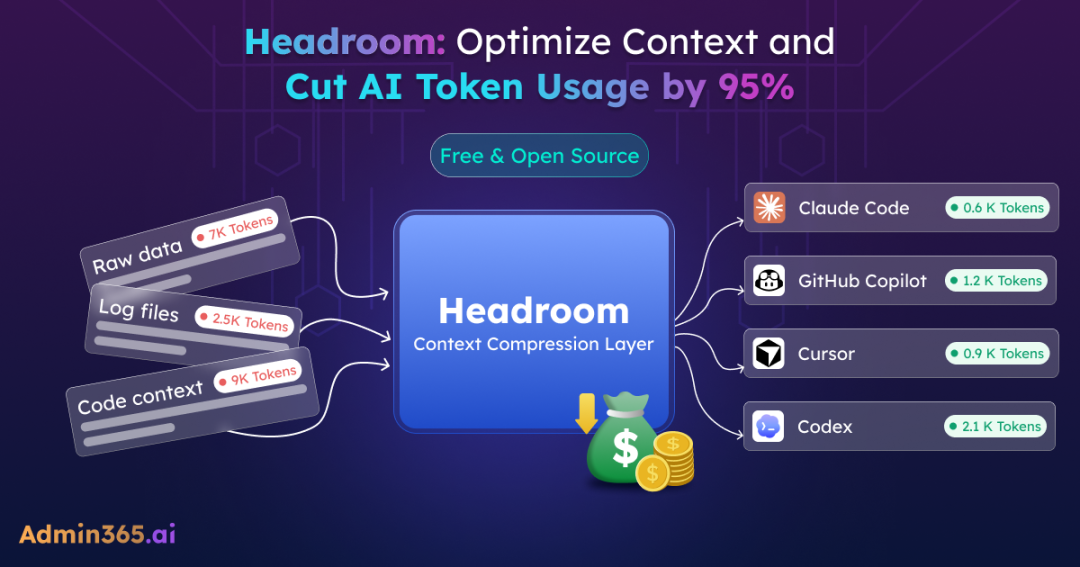
AI applications are becoming more powerful, but they are also becoming more expensive to run. When an AI application interacts with an LLM, it sends more than just the user’s latest message. It also includes conversation history, tool outputs, documents, search results, and other contextual data. As this context grows, more tokens are consumed with every request, increasing AI usage costs.
Headroom is an open-source tool built to solve this problem. In this blog, we’ll explore how Headroom works, how it compresses AI context, and the impact it can have on reducing token usage.
What is Headroom and Where it is Useful?
Headroom is an AI context compression tool that reduces unnecessary information before it reaches the large language model (LLM). It can also wrap popular AI coding agents to automatically optimize context during development workflows, helping keep tools like Claude from hitting usage limits during long coding sessions.
It compresses large inputs such as conversations, documents, tool outputs, search results, logs, and code into a smaller version while preserving the original context. In many deployments, Headroom can reduce token usage without changing prompts or models, and often with minimal application changes.
It is most useful in AI workflows where context keeps growing, such as:
- AI agents — compresses tool outputs and workflow data before they add unnecessary context
- RAG and document search — reduces retrieved content before sending it to the model
- Coding assistants — shrinks large files and code context while preserving structure
- Long conversations — removes older, less useful context instead of resending everything
- Log analysis tools — reduces large logs and error traces before processing
- Multi-model applications — provides context optimization across different AI providers
How Does Headroom Compress Context?
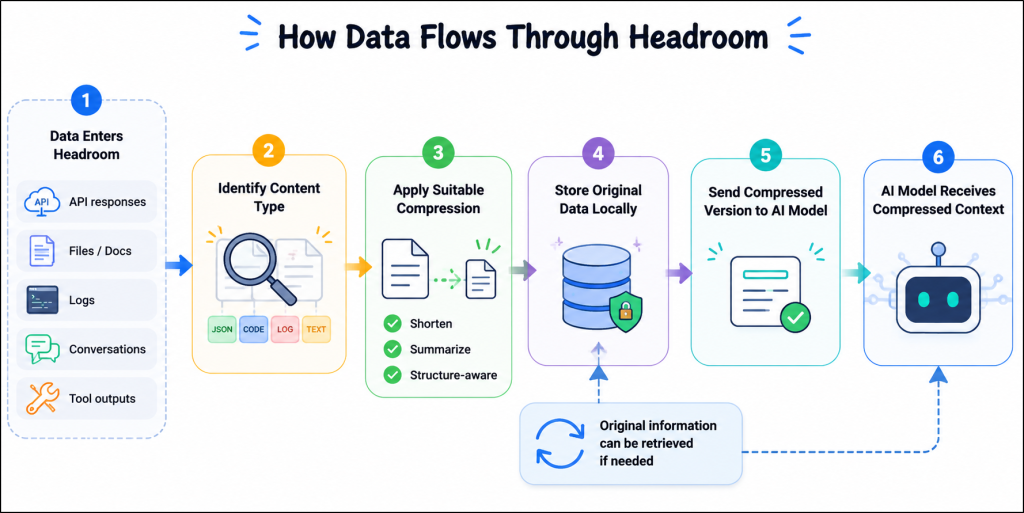
Headroom works between your application and the AI model. Before information reaches the model, it identifies the type of content and applies the right compression method automatically.
For example, imagine an AI agent helping a developer troubleshoot an application issue. During the process, it may collect:
- API responses
- Error logs
- Code snippets
- Documentation
- Previous conversation messages
Instead of sending all this data repeatedly, Headroom processes it first:
- API responses and structured data are converted into shorter formats while preserving important details.
- Code can be compressed using code-aware strategies that help preserve important structure and context.
- Long conversations are optimized by reducing older or less relevant content.
The process happens automatically — you don’t need to manually select what should be compressed.
Behind the scenes, the workflow looks like this:
How Does Headroom Preserve Response Quality During Compression?
A common concern with compression is whether reducing information affects AI responses.
Headroom is built around a CCR (Compress-Cache-Retrieve) approach. Instead of permanently removing information, it compresses the context, stores the original data locally, and retrieves it only when the model needs more details.
To measure whether compression affects results, Headroom uses benchmark datasets. These are standard test collections used to evaluate AI models on specific tasks, such as answering questions or solving problems. They help compare model performance before and after changes.
The benchmarks support the idea that compression does not reduce response quality. In Headroom’s published tests, GSM8K math accuracy stayed the same as the baseline (0.000 change), while TruthfulQA improved slightly (+0.030). This shows the model can work with compressed context with more relevant information.
Compression Efficiency Across Different Workloads
The token savings depend on the type of content. Structured data like logs, code, and API responses usually compress better, while shorter text may see smaller reductions. You can use headroom stats to view the actual savings in your workloads.
| Workload | Tokens Before | Tokens After | Token Savings |
| Code Search Results | 17,765 | 1,408 | 92% |
| Incident & Log Analysis | 65,694 | 5,118 | 92% |
| GitHub Issue Triage | 54,174 | 14,761 | 73% |
| Codebase Exploration | 78,502 | 41,254 | 47% |
How to Get Started with Headroom
Headroom can be used in different ways depending on how you work with AI applications. Whether you’re using an AI coding assistant, integrating AI into an application, or looking for a low-code deployment option, Headroom provides multiple ways to get started.
Headroom requires Python 3.10 or later and is published on PyPI as headroom-ai. Once the prerequisites are met, you can install Headroom from PyPI or its GitHub repository and choose the deployment method that best fits your workflow.
Step 1: Install Headroom
Install Headroom using the package manager that matches your environment.
For Python:
|
1 |
pip install "headroom-ai[all]" |
For Node.js or TypeScript:
|
1 |
npm install headroom-ai |
Step 2: Choose a Workflow Integration
After installation, select the option that best fits your workflow.
Option 1: Wrap an AI Coding Agent
If you use AI coding tools such as Claude Code or Codex, Headroom can sit between the agent and the model to automatically compress context and reduce token usage.
|
1 |
headroom wrap claude |
|
1 |
headroom wrap codex |
This is the simplest way to start benefiting from context compression without modifying your workflow.
Option 2: Run Headroom as a Proxy
If you want to reduce token usage with minimal application changes, run Headroom as a proxy.
|
1 |
headroom proxy --port 8787 |
Your application can then send requests through the proxy, allowing Headroom to compress context before it reaches the AI model.
Option 3: Integrate Headroom into Your Application
Developers building custom AI applications can integrate Headroom directly as a library. This provides greater control over how context is compressed and managed within the application.
Option 4: Use MCP Integration
If your AI client supports the Model Context Protocol (MCP), Headroom can be used as an MCP-compatible tool to provide context compression and retrieval capabilities.
Step 3: Monitor Token Savings
After Headroom is running, you can review how much context compression is reducing token usage.
|
1 |
headroom stats |
This command displays compression statistics and token savings achieved across your workloads.
Step 4: Improve Compression Over Time
Headroom can learn from previous sessions and generate corrections that help improve future compression behavior.
|
1 |
headroom learn |
This analyzes past interactions and uses the findings to refine how context is compressed for similar workloads.
Headroom vs Native AI Prompt Caching: Which One Saves More Tokens?
AI providers already offer prompt caching, so a common question is: do you still need Headroom?
The answer depends on what is increasing your AI context size. Prompt caching and Headroom solve different problems. Caching helps with repeated content, while Headroom helps optimize large, changing context.
The table below shows which approach fits different types of contexts:
| Context type | Prompt caching | Headroom |
| Repeated prompts, system instructions, tool definitions | ✅ Best fit — reuses the same content across requests | ➖ Less impact — content is already handled efficiently by caching |
| Long conversations | ➖ Limited — history keeps growing even if contexts repeat | ✅ Optimizes growing conversation context |
| Tool outputs, API responses, logs | ❌ Not effective — content changes with each request | ✅ Compresses large outputs before they reach the LLM |
| RAG documents and search results | ❌ Not effective — retrieved content varies by query | ✅ Reduces retrieved context size |
| Code files and repositories | ❌ Not designed for changing code context | ✅ Optimizes code context |
| Multi-model workflows | ❌ Often provider-specific | ✅ Works across different AI providers |
Frequently Asked Questions About Headroom
1. Which AI coding agents does Headroom support?
Headroom works with popular AI coding agents including Claude Code, Codex, Cursor, Aider, Copilot CLI, and OpenClaw.
2. What types of applications benefit most from Headroom?
Headroom is particularly useful for AI agents, coding assistants, RAG applications, log analysis tools, and other workflows where large amounts of context are generated over time.
3. Does Headroom permanently remove information during compression?
No. Headroom compresses context to reduce token usage, but the original content is retained locally and can be accessed when needed.
4. Is Headroom suitable for sensitive or private data?
Headroom is designed as a local-first solution, allowing compression to occur before data is sent to an AI provider. However, organizations should still review their security, compliance, and data-handling requirements before deployment.
5. When should you consider using Headroom?
Headroom is most valuable when your AI application frequently processes large logs, files, codebases, retrieved documents, or long conversations. For lightweight workloads with minimal context, the benefits may be smaller.
6. When might Headroom not be the right fit?
If your prompts are short, your provider’s built-in context optimization already meets your needs, or your environment does not allow local processes, the benefits may be limited. As with any optimization tool, it’s best to evaluate the savings against your specific workload.
That’s all about it! Headroom isn’t a replacement for better prompts or retrieval strategies, but it can be a valuable addition to context-heavy AI workflows. If token costs are becoming a concern, it’s worth evaluating the savings it can deliver in your environment.