Active Directory administrators are increasingly turning to AI to speed up repetitive tasks. Need a list of inactive users? Ask an AI assistant. Need a PowerShell script to export group membership? AI can generate one in seconds.
But that convenience introduces an important question:
What information are you actually sharing with the AI?
This is where many Active Directory administrators remain cautious. User accounts, group memberships, organizational structures, and other directory data are highly sensitive. Before adopting AI-powered administration tools, administrators want to understand what data is shared, where it is processed, and what safeguards are in place to protect it.
Understanding how an AI assistant handles requests is therefore just as important as the tasks it can perform.
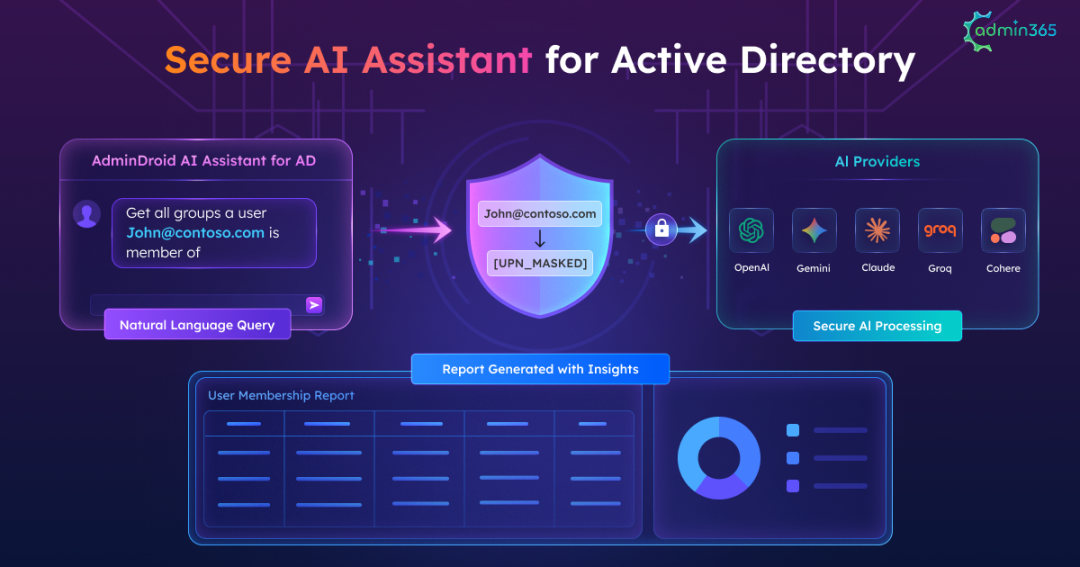
The AdminDroid AI Assistant for Active Directory is designed with these concerns in mind. It converts natural language requests into LDAP queries and generates Active Directory reports or performs management actions, all while keeping directory data within your environment.
In this blog, we’ll explore how the AdminDroid AI Assistant processes requests, protects sensitive information through data masking, and enables secure AI-powered Active Directory administration without exposing directory data.
How the AdminDroid AI Assistant Processes Active Directory Requests:
Before adopting any AI-powered administration tool, it is important to understand exactly what role the AI plays in the process. The answer determines both the security posture and operational risk of the solution.
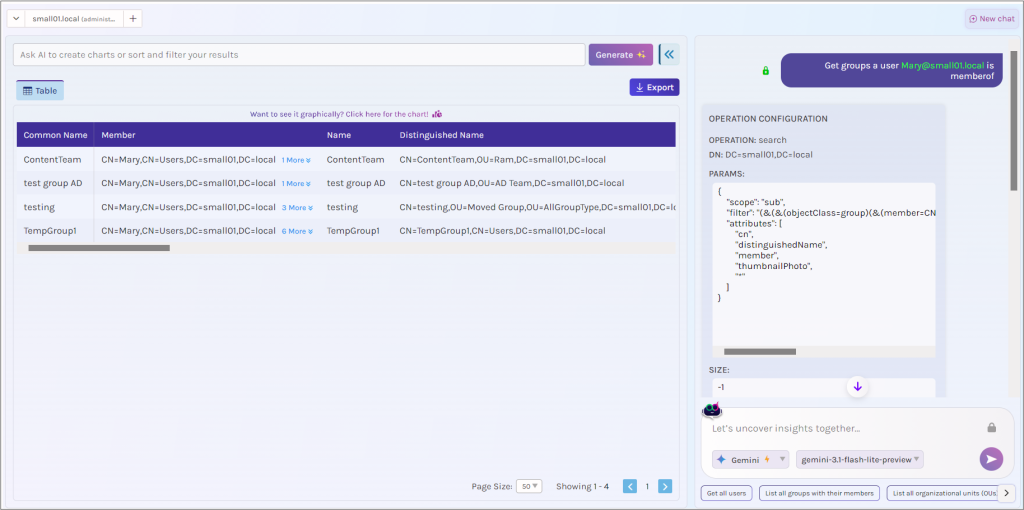
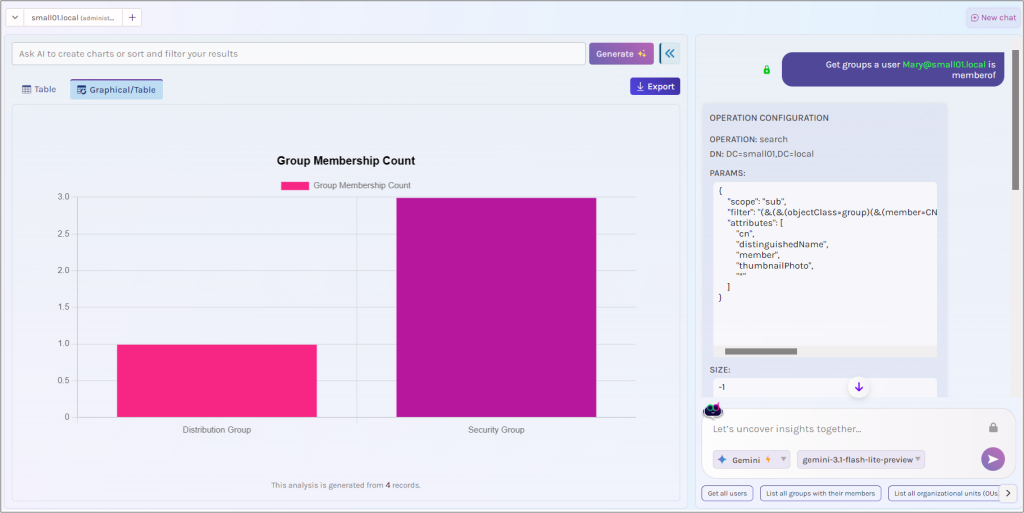
Consider a simple reporting request: Get all groups a user [email protected] is member of.
The request follows six stages.
Step 1: Enter a Natural Language Request
Administrators simply describe what they need using plain English.
In our case: Get all groups a user [email protected] is member of.
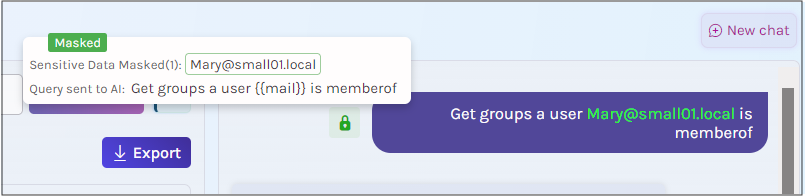
Step 2: Sensitive Information Is Masked Before Transmission
Before any request is sent to AI, the assistant applies masking rules to protect sensitive information contained in the prompt.
This ensures that protected values are replaced with placeholders before transmission.
What the AI receives: Get all groups a user {user1} is member of.
Step 3: The AI Generates Query, Not Results
A common misconception is that AI assistants analyze Active Directory data directly. That is not how the AdminDroid AI Assistant operates.
The AI receives the masked request and converts it into an LDAP query to generate the report.
AI interpretation
- Object Type: User
- Lookup Value: {user1}
- Action: Retrieve Group Memberships
Notice that the AI works with placeholders rather than actual directory values. In this example, the user’s identity is represented as {user1} rather than the real account name or email address.
As a result, the AI never receives the actual user account, group memberships, or any other Active Directory data. It only processes the masked request and generates the query needed to fulfill it.
Once the query is returned, the tool replaces the placeholders with the original values locally
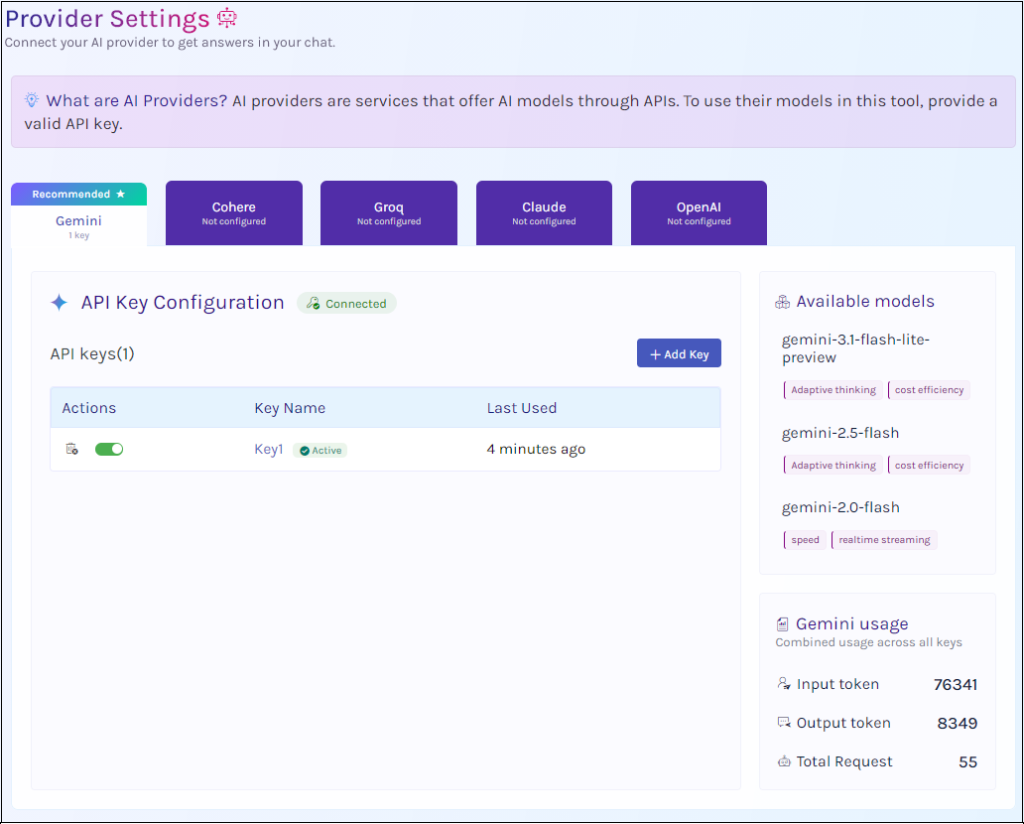
Just as importantly, the AI provider is your choice. Whether your organization prefers ChatGPT, Gemini, Claude, Groq, or Cohere, you connect the service using your own API key. The tool does not decide where requests are sent, giving you full control over which AI platform processes the masked prompt.
Step 4: Review the Generated Query
Before anything executes, the assistant displays the LDAP query generated from your request. Administrators can verify:
- Search scope
- Report criteria
- Time ranges
- Filters
- Target objects, etc.
For example, if you requested inactive users for 90 days, you could verify that the inactivity threshold is correctly configured before proceeding. This approval stage acts as a safeguard between AI interpretation and execution.
Step 5: Queries Execute Locally
Once approved, the request is processed directly against the organization’s domain controller.
The AI service is no longer involved at this stage. All directory lookups and processing occur within the local environment.
Step 6: Review the Results
Results are displayed locally as structured reports in a tabular format, allowing you to sort, filter, and export the data with ease.
You can also visualize the data through charts to quickly identify trends, anomalies, and patterns.
Beyond Reporting: Perform Active Directory Management Actions
The same workflow extends beyond reporting. The AI Assistant also supports management operations such as creating, updating, and deleting Active Directory objects using natural language requests. However, unlike a report that only reads data, management actions can modify your environment.
That’s why the approval stage remains mandatory. Every management action requires administrator review and explicit approval before execution, providing a critical safeguard against unintended or potentially disruptive changes. This ensures that administrators always remain in control, regardless of how the request was generated.
Two Layers of Data Masking Protect Every Request:
Since the request itself is the only information transmitted, protecting the request becomes a critical security requirement.
The AdminDroid AI Assistant includes two layers of masking that operate before any data is sent to AI. Both layers work together to protect sensitive information while preserving the context required for accurate interpretation.
Layer 1: Automatic Protection for Sensitive Data
The first layer operates automatically and requires no administrator intervention.
Standard personal and sensitive information is detected and replaced with placeholders before transmission. This includes:
- Email addresses
- User principal names (UPNs)
- Phone numbers
- URLs
- IP addresses
- Credit card numbers
Protection is applied automatically, even if the administrator does not explicitly identify the data as sensitive.
Layer 2: Custom Masking for Organization-Specific Data
The second layer protects information unique to the organization.
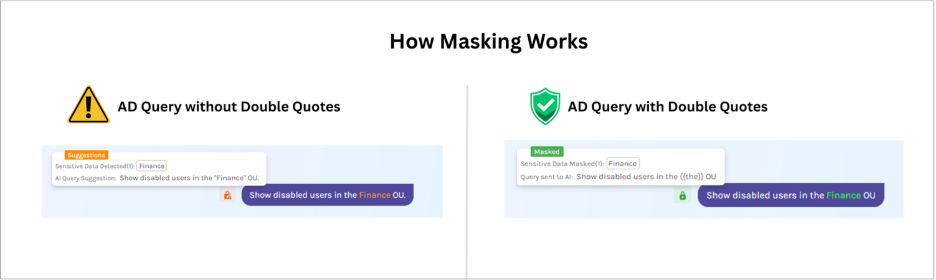
Administrators can mask organization-specific values by enclosing them in double quotes.
Examples include:
- Employee IDs
- Client names
- Project codes
- Internal identifiers
- Organizational Units (OUs)
- Group names
- Department names
For example: Show disabled users in the “Finance” OU.
The OU name is replaced with a placeholder before transmission. If entered without quotation marks, it is transmitted as written.
Verify Exactly What Gets Sent to AI:
Transparency is a critical component of AI security. Rather than masking information behind the scenes, the AdminDroid AI Assistant provides a preview showing how the original request is transformed before transmission.
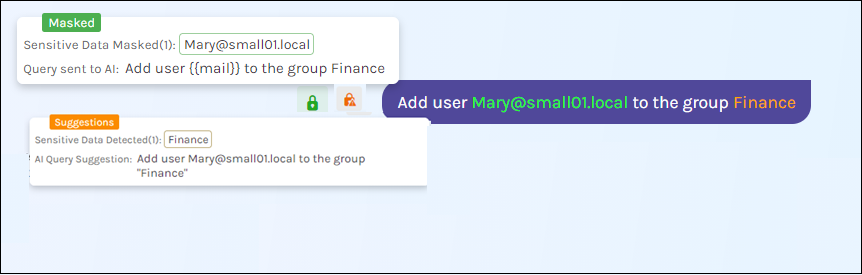
Importantly, masking does not reduce the quality of the generated response. Values are replaced with placeholders rather than removed entirely, preserving the meaning and context of the request.
What the AdminDroid AI Assistant for Active Directory Can Do
Understanding the security model answers the question of safety. The next question is capability.
The AdminDroid AI Assistant functions as a natural-language interface for Active Directory reporting and management.
Other key capabilities include:
- Multi-Domain Management: Administrators can switch between domains and manage multiple Active Directory environments from a single interface.
- Interactive Data Analysis: Results can be filtered and sorted to focus on relevant objects and quickly identify issues.
- Visual Reporting: When trends matter more than rows, results can be displayed as charts for easier analysis and presentation.
- Flexible Report Export Options:Reports and charts can be exported in multiple formats, including: CSV, Excel, HTML, PDF, PNG, JPEG
- Context-Aware Follow-Up Queries: Instead of restarting the process for every request, administrators can refine existing results through follow-up questions and iterative analysis.
Should You Trust AI with Active Directory?
AI-assisted administration does not require unrestricted access to directory data. The critical factors are transparency, data boundaries, and administrator control.
The AdminDroid AI Assistant for Active Directory is designed around these principles. Requests are processed through a controlled workflow where sensitive information is masked before transmission, and directory data remains within the organization’s environment. Additionally, every report or management action requires administrator approval before execution.
This approach allows organizations to benefit from natural language administration while maintaining the security, governance, and operational oversight expected in enterprise Active Directory environments.
Explore & Download: AdminDroid AI Assistant for AD
The AdminDroid AI Assistant for Active Directory is a free, open-source tool available for download from GitHub.
Start with a simple read-only request, such as checking a user’s group memberships or identifying inactive accounts, and review how the masking and approval workflow operates. Once you’re comfortable with the process, you can confidently expand to more advanced reporting and management tasks.
Have you tried AI for Active Directory administration? Share your experience, use cases, or feedback in the comments below.