
Most AI tools today still rely on a familiar interaction model. You ask a question, get a response, and refine prompts until you reach the desired result. It works, but you’re still doing heavy lifting while the AI responds step by step.
However, Claude from Anthropic has steadily pushed beyond that model. While Claude Chat focuses on conversational assistance, Claude Code already enables developers to write and execute code autonomously.
That works well for developers. But what about everyone else?
That’s where Claude Cowork comes in. It brings a similar autonomous approach to everyday workflows. Instead of guiding the AI through each step, you define a goal. Cowork breaks it into subtasks, coordinates them, and delivers structured outputs.
This could be a report saved locally, a spreadsheet with working formulas, or a presentation ready for review, not just another chat response. Let’s take a closer look at what Claude Cowork is, what it can do today, and where it still has room to improve.
What is Claude Cowork?
Claude Cowork is developed by Anthropic as part of the Claude ecosystem. Initially, Cowork was introduced as a Research Preview in January 2026 and expanded to all paid plans on April 9, 2026.
At its core, Claude Cowork is designed to operate directly within your system and handle multi-step tasks with minimal intervention. Once a goal is defined, it creates a structured plan, executes tasks in parallel, and delivers complete outputs.
The following three key capabilities power this experience:
Works directly in your files: Cowork operates within your local file system. You can point it to a folder, and Claude can read, edit, and create files there. There’s no need to upload data into a chat or move outputs between tools. Your files remain in the workspace.
Runs parallel workstreams: For complex tasks, Cowork breaks goals into smaller subtasks and executes them simultaneously. For example, when analyzing multiple reports, it can handle data extraction, synthesis, and presentation creation in parallel.
Executes safely in isolated environments: When tasks require running scripts or commands, Cowork uses a sandboxed virtual environment like Apple VZVirtualMachine. This ensures that execution happens in an isolated environment, not on your local system.
Claude Chat vs. Claude Cowork vs. Claude Code
To better understand where Claude Cowork fits, the table below compares it with other Claude experiences.
| Feature | Claude Chat | Claude Cowork | Claude Code |
| Interaction | Follows a prompt-and-response conversation model | Executes tasks based on a defined goal | Focuses on coding tasks with guided or autonomous execution |
| Output | Generates text-based responses within the chat | Produces complete outputs like files, reports, or presentations | Generates and executes code with outputs like scripts or results |
| Duration | Handles short, session-based interactions | Manages long-running, multi-step workflows | Supports variable durations based on coding complexity |
| Data Access | Uses uploaded files and chat context | Works directly with local files and folders | Accesses local files and development environments |
| Sub-agents | Does not use sub-agents | Uses parallel sub-agents to handle multiple tasks | Uses limited task-specific processes when needed |
| Scheduled Tasks | Does not support scheduling | Supports task orchestration for extended workflows | Not designed for scheduled execution |
| Token Consumption | Uses fewer tokens per interaction | Consumes more tokens due to multi-step execution | Uses moderate to high tokens depending on the autonomous execution |
| Use Cases | Questions, explanations, drafting, brainstorming ideas | Reports & presentations, file processing, research synthesis, recurring automated tasks | Writing & editing code, debugging & testing, running scripts & commands |
Key Capabilities of Claude Cowork
Claude Cowork executes tasks on your behalf across your working environment, helping you move from intent to execution with minimal effort. Here’s what you can do:
Local Files and Folders Handling
If it involves files and knowledge work, Cowork can handle it:
- Generate Word reports, Excel spreadsheets with formulas, PowerPoint decks, and PDFs with minimal post-editing.
- Clean CSV files, normalize formats, and prepare analysis-ready datasets.
- Combine notes across multiple files into structured summaries or reports.
- Sort, rename, and restructure folders based on defined logic.
- Perform competitive analysis, market research, and multi-source synthesis using web and connected tools.
MCP Connectors for External Services
Cowork doesn’t live inside a walled garden. It connects to 38+ external services through MCP (Model Context Protocol), and every connector is free. Anthropic added 12 new connectors in February 2026 alone, and the list keeps growing.
| Category | Connectors |
| Productivity | Microsoft 365, Google Workspace, Zoom, Slack, Zapier |
| CRM and Sales | Salesforce, HubSpot, Apollo, Clay, Outreach |
| Development | GitHub, Jira, Linear, Figma |
| Finance and Research | FactSet, MSCI, Similarweb |
| Legal and Documents | DocuSign, LegalZoom, Harvey, WordPress |
Additionally, MCP is an open protocol, so if your internal tool isn’t on the list, your team can build a custom connector for it. This is a meaningful difference from Microsoft 365 Copilot Cowork, which at launch only connects to Microsoft 365 apps, with no support for third-party tools.
You can also get control over what connectors can actually do. For example, the sales team needs to pull data into Cowork, but you don’t want Claude to create records on their behalf. You can allow read and block write, per connector, across the whole organization.
Automate Recurring Work with Scheduled Tasks
This is where Cowork starts feeling less like a tool and more like a recurring employee. Simply type /schedule in the Cowork interface to set up a recurring task. You provide the prompt once, and Claude handles the execution at your chosen frequency like hourly, daily, weekly, or on demand.
Since Claude can access your files and M365 data through connectors, you can set up automations that require complex PowerShell scripts or Power Automate flows.
Extend Cowork with Custom Skills
Most of us think we need an API or a developer to customize an AI agent. With Claude Cowork, it’s as simple as managing a file system. Here, you can instantly teach Claude about new, specialized workflows without touching a single line of code or navigating complex AI studios.
Simply drop a file named SKILL.md into a subfolder within your Cowork Skills directory. Claude automatically scans and “ingests” these files at the start of every new conversation.
While skills are specific, Global Instructions act as your “System Default”. Go to Settings > Cowork, click Edit next to Global instructions. Then, define your preferred output formats (e.g., “Always use CSV for data”), your professional tone, or specific naming conventions for files. This keeps output consistent with your organization’s branding and standards without repeating prompts.
Enterprise Governance for Claude Cowork
- Control Who Can Access Cowork
- You can organize users into groups manually or via SCIM (from Entra ID or other identity providers) to assign specific Cowork roles.
- Limit Cowork Token Spend Per Team
- Cowork consumes tokens faster due to multi-step execution. So, you can set per-team usage limits from navigating to Organization settings > Usage to control costs.
- Auditing with OpenTelemetry & Analytics
- Claude Cowork provides built-in auditing and usage insights through OpenTelemetry and the Analytics API. It generates structured activity logs that integrate with SIEM tools, giving visibility into tools and connectors used, files accessed or modified, skills executed, and user approvals.
- In addition, the admin dashboard and Analytics API offer insights into adoption, including active users, usage frequency, connector and skill usage, and DAU, WAU, and MAU metrics. This helps organizations track usage patterns and evaluate the effectiveness of their Cowork deployment.
Claude Cowork Pricing Across Plans
Every paid Claude plan includes Cowork. The difference between tiers is how much you can use it, not what features you get.
| Plan | Price | Usage Level |
| Pro | $17/month (annual) or $20/month (monthly) | Base |
| Max 5x | $100/month | 5x Pro |
| Max 20x | $200/month | 20x Pro |
| Team – Standard seat | $20/seat (annual) / $25 (monthly) | ~Pro level |
| Team – Premium seat | $100/seat (annual) / $125 (monthly) | 5x Standard |
| Enterprise | Custom | Custom |
Team plans need at least 5 seats, and Standard and Premium can be mixed within the same team. Enterprise adds a 500K context window, HIPAA readiness, and compliance tooling.
How to Access Claude Cowork
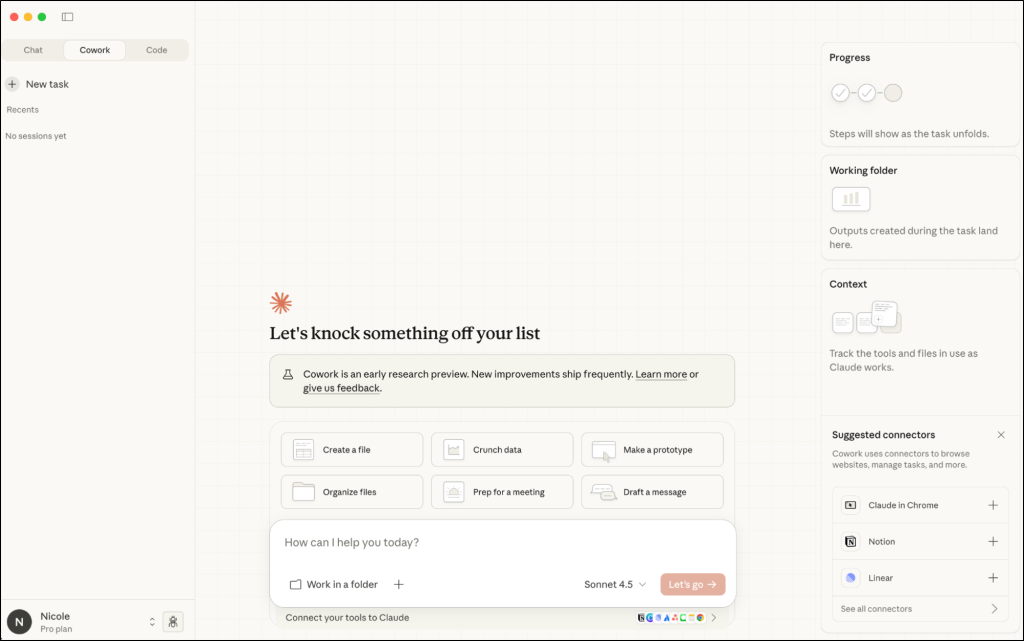
Claude Cowork is available through the Claude Desktop app, where it works directly with your local files and system environment. Follow the steps below to access Claude Cowork:
- Download and install the Claude Desktop app.
- Then, open the app and navigate to the Cowork section from the main interface.
If Cowork is not visible, ensure your plan supports it and that you’re signed in with an active paid account.
Before Cowork can do anything useful, it needs a folder to work in. Click Work in a Folder at the bottom of the interface and pick one. If a task needs files from multiple locations, you can grant access to additional folders. For deleting files, Cowork always asks for confirmation.
Limitations of Claude Cowork
Claude Cowork comes with a few operational constraints to keep in mind:
- Scheduled tasks run only when your computer is awake, and the Claude Desktop app is open. If the system is asleep or the app is closed, tasks are skipped and resume once the app reopens.
- Cowork is available only through the desktop app, with no support for mobile devices or browser-based access.
- Conversation history is stored locally on the device, while enterprise monitoring relies on OpenTelemetry events.
- Autonomous execution with sub-agents consumes more tokens compared to standard chat interactions.
- Cowork does not retain context across standalone sessions. Projects must be used to maintain continuity across related tasks.
- Cowork requires Apple Silicon on macOS, and Intel-based Macs are not supported.
Claude Cowork signals a broader shift in how AI is used at work, moving from assistance to execution. While still evolving as a relatively new capability, it offers a clear glimpse into a future where AI handles multi-step tasks with minimal user intervention.
As adoption grows and the feature set matures, what capabilities are you most interested in exploring, and how do you see Claude Cowork fitting into your daily workflows? Share your thoughts below and stay tuned for more updates!