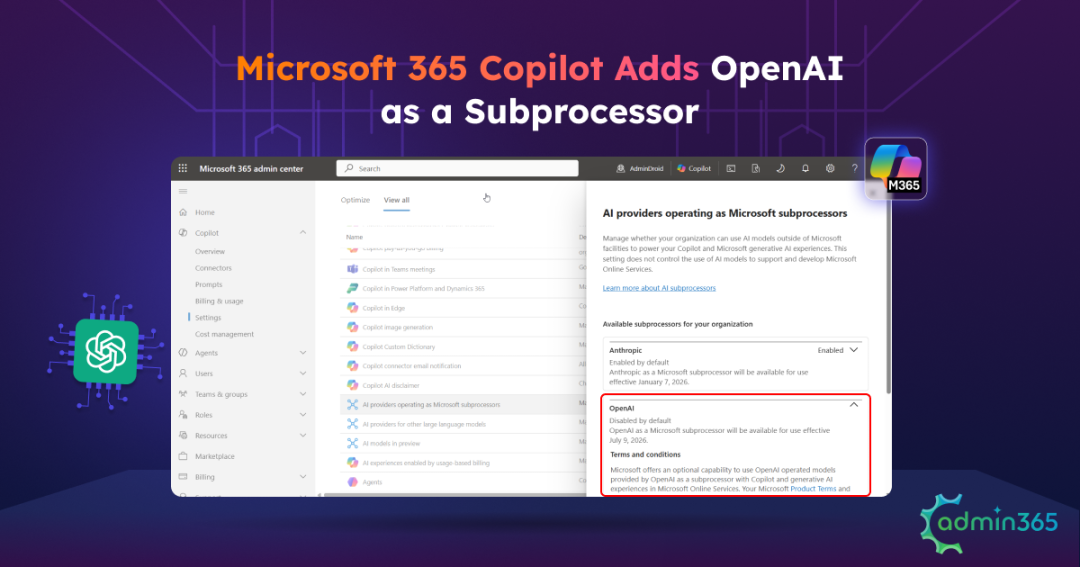
Microsoft 365 Copilot’s AI ecosystem is expanding once again. Following Anthropic’s onboarding as a Microsoft subprocessor, Microsoft is now introducing OpenAI-operated models as another AI subprocessor. While this update promises massive performance upgrades for Copilot power users, it also raises the following questions.
What exactly is an AI subprocessor? How is this different from the GPT models already powering Microsoft 365 Copilot? Does this change how enterprise data is processed or used to train OpenAI models? And what does it mean for your organization’s security and compliance?
If you are navigating these questions following the announcement, you’re not alone. In this blog, we’ll break down exactly what an AI subprocessor is, how it fits into your processing pipeline, and what the new OpenAI addition means for your enterprise data security.
What is an AI Subprocessor in Microsoft 365?
An AI subprocessor is a third-party AI service provider that Microsoft authorizes to process customer data on its behalf to deliver AI-powered experiences in Microsoft 365. Rather than relying solely on Microsoft’s own AI models, Microsoft can route eligible AI requests to approved subprocessors while remaining responsible for protecting customer data.
These subprocessors operate under Microsoft’s Product Terms and Data Protection Addendum (DPA), ensuring they adhere to Microsoft’s enterprise-grade security, privacy, and compliance requirements. They process customer data only to generate AI responses for Microsoft 365 services and are not permitted to use customer prompts, files, or responses to train their public AI models.
In short, Microsoft remains your primary service provider, while approved AI subprocessors work behind the scenes under Microsoft’s security and compliance framework to power advanced AI capabilities.
Now that we’ve defined the subprocessor role, let’s look at what actually changes with the addition of OpenAI-operated models in Copilot.
OpenAI Models as an AI Subprocessor in Microsoft 365 Copilot
On June 23, 2026, Microsoft added OpenAI to its list of approved AI subprocessors for Microsoft 365 Copilot. This allows Microsoft to route eligible AI requests to OpenAI-operated models, expanding the range of foundation models available to Copilot users.
To support this rollout, Microsoft also introduced a new admin control in the Microsoft 365 admin center.
- July 9, 2026: The new setting became available in the Microsoft 365 admin center and is disabled by default, giving administrators time to review and configure it.
- July 24, 2026: Microsoft will automatically enable this setting for all users in eligible commercial tenants if no action is taken. Organizations that don’t want users to access OpenAI-operated models must explicitly set the OpenAI subprocessor control to No users.
What Actually Changed: OpenAI as a Subprocessor vs. the GPT Already in Copilot
Although Microsoft 365 Copilot already uses GPT models through Azure OpenAI, this update introduces an additional AI processing path. By adding OpenAI as an approved AI subprocessor, Microsoft can bring the latest OpenAI-operated models to Copilot while continuing to offer enterprise controls.
This change helps Microsoft:
- Provide access to the latest OpenAI foundation models, starting with the GPT-5.6 family.
- Expand Copilot’s AI capabilities by supporting multiple AI model providers.
- Accelerate access to future AI model innovations.
- Continue offering enterprise-grade administrative controls for AI model access.
So, how is this different from the GPT experience already available in Microsoft 365 Copilot? The answer comes down to who operates the AI model, where eligible AI requests are processed, and whether the new OpenAI subprocessor setting applies.
| Characteristics | OpenAI-operated models (new) | Azure OpenAI (already in Copilot) |
| Operated by | OpenAI | Microsoft |
| Runs on | OpenAI’s infrastructure | Microsoft’s Azure infrastructure |
| Controlled by the new subprocessor setting | Yes | No |
| Example model | GPT-5.6 | The GPT models Copilot already uses |
Both serve the same GPT-based Copilot experiences, so your users may not notice which one answered them. For administrators, however, the distinction is important because only the OpenAI-operated path is governed by the new subprocessor setting.
Important: Setting the OpenAI subprocessor control to No users does not disable GPT in Microsoft 365 Copilot. Copilot continues to use GPT models through Azure OpenAI. This setting only prevents eligible requests from being processed by OpenAI-operated models, including GPT-5.6 and future OpenAI-operated models.
One thing does not change on either path. Your prompts, responses, and the data Copilot reaches through Microsoft Graph are not used to train foundation models. Microsoft’s existing commitment still holds after you enable OpenAI.
How to Control OpenAI-Operated Models in Microsoft 365 Copilot
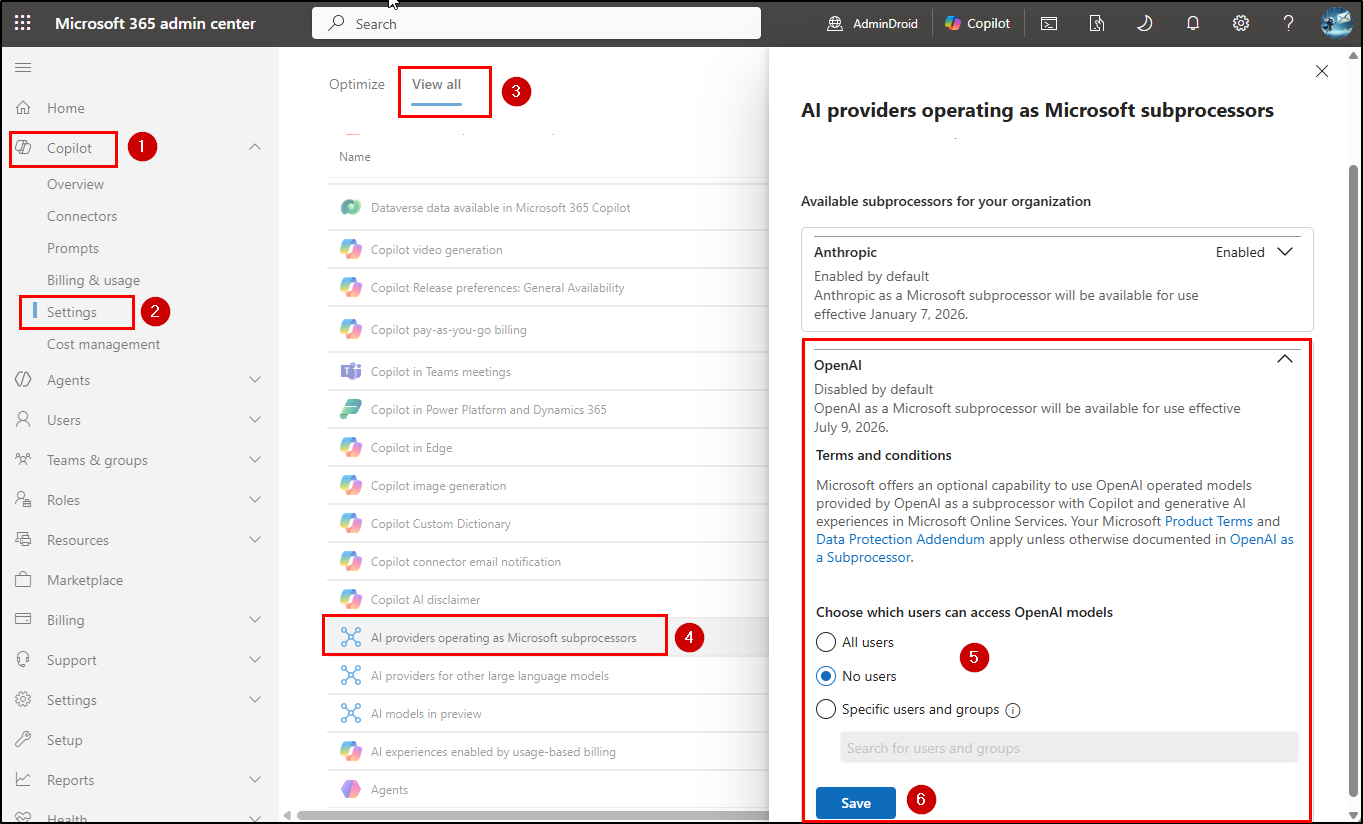
Whether your organization wants to adopt the latest OpenAI-operated models or continue using Azure OpenAI-hosted models, admins can control access using the OpenAI subprocessor setting in the Microsoft 365 admin center. To manage this setting, you’ll need either the AI Administrator or Global Administrator role.
- Sign in to the Microsoft 365 admin center, then navigate to Copilot > Settings > View all.
- Select AI providers operating as Microsoft subprocessors.
- Under Available subprocessors for your organization, expand OpenAI.
- Then, you can Choose which users can access OpenAI operated models, using any one of the following options.
- All users: Allows all users in your organization to access OpenAI-operated models. If no action is taken, Microsoft will automatically apply this setting to eligible commercial tenants starting July 24, 2026.
- Specific users or groups: Restricts access to selected users or Microsoft Entra security groups. This option is ideal for piloting OpenAI-operated models, such as GPT-5.6, with a limited set of users before a broader deployment.
- No users: Prevents Microsoft 365 Copilot from using OpenAI-operated models while continuing to use Azure OpenAI-hosted models. Choose this option to disable the OpenAI subprocessor for Microsoft 365 Copilot.
- Select Save.
Key Considerations Before Enabling OpenAI-Operated Models
Before enabling OpenAI-operated models, keep the following points in mind:
- OpenAI-Operated Model Data Considerations: Unlike Anthropic models, which are excluded from the EU Data Boundary and use flex routing, OpenAI-operated models are included in the EU Data Boundary (with documented exceptions). However, they are currently excluded from in-country processing commitments, meaning your data stays within the EU but can be routed between different European data centers.
- Availability and Compliance: OpenAI-operated models aren’t available in GCC, GCC High, DoD, or sovereign cloud environments. They also don’t currently support certifications such as FedRAMP High, PCI DSS Attestation of Compliance, HITRUST CSF, and SOC 1 Type 2. Organizations with strict regulatory or compliance requirements should evaluate these limitations before enabling the feature.
- Copilot Studio Requires an Additional Configuration: If your organization uses Copilot Studio, enabling OpenAI-operated models in the Microsoft 365 admin center isn’t sufficient. You must also enable Allow external LLMs for generative responses in the Power Platform admin center before Copilot Studio agents can use OpenAI-operated models.
Frequently Asked Questions
- Does disabling OpenAI as a subprocessor break Copilot?
No. Copilot keeps running on Azure OpenAI, the GPT models Microsoft operates. Setting the OpenAI subprocessor to No users only removes the OpenAI-operated path, such as GPT-5.6 running on OpenAI’s infrastructure. A few features that depend on those models may become unavailable, but Copilot itself keeps working.
- Is this the same as the GPT models already in Copilot?
No. The models already in Copilot are operated by Microsoft through Azure OpenAI. The new subprocessor path is operated by OpenAI on OpenAI’s own infrastructure. It is the same family of models with a different operator and location.
- Is my data used to train OpenAI’s models?
No. Microsoft’s commitment stands: your prompts, responses, and Microsoft Graph data are not used to train foundation models, including on the OpenAI-operated path.
- Does this work in GCC, GCC High, or DoD?
No. OpenAI-operated models are not available in government or sovereign clouds, and the setting does not appear for those tenants.
- Do I need to do anything before July 24, 2026?
Only if you want something other than “enabled for all users,” which is the automatic result on that date. To pilot with a group first or hold your current state, set the control to a group or to No users before July 24.
In conclusion, OpenAI-operated models bring new AI capabilities to Microsoft 365 Copilot, but they also require an informed administrative decision. Review your organization’s security, compliance, and data residency needs, then configure the OpenAI subprocessor setting accordingly.
Thanks for reading! Have questions or thoughts about this update? Share them in the comments below.